
Social Media MCP Server
Connect AI to Social Media with the Blog2Social MCP Server
Give AI assistants and agents direct access to your social media publishing workflow through the hosted Blog2Social MCP Server. Connect your Blog2Social account securely with OAuth and start working with natural-language instructions—no local MCP server installation required.
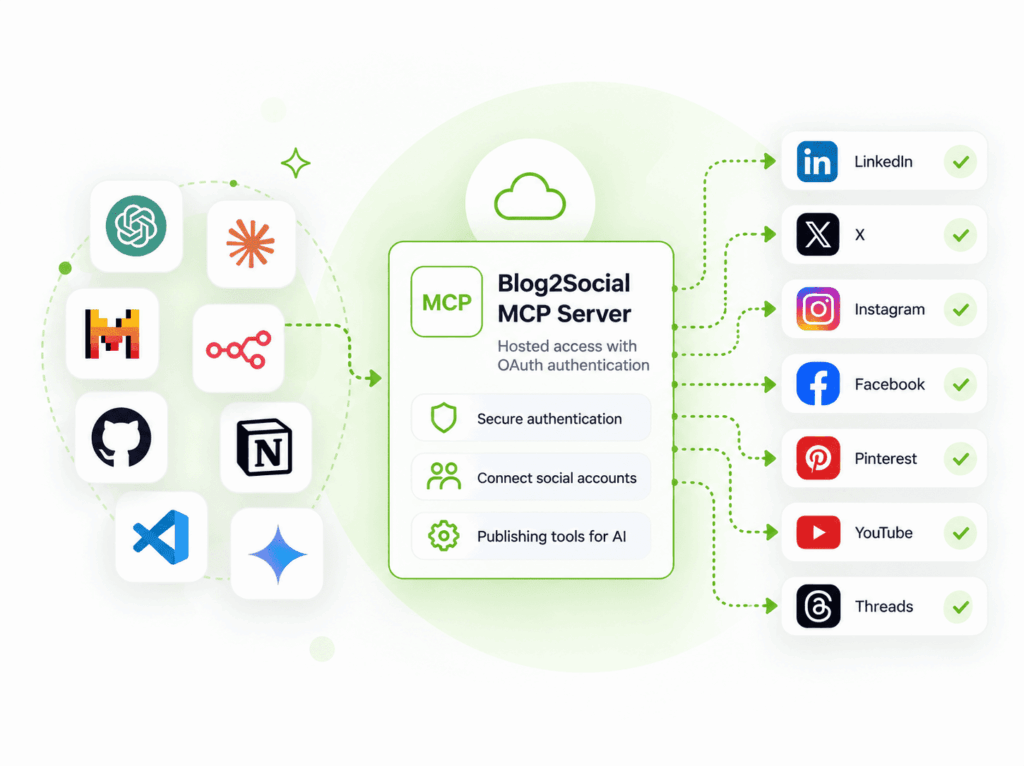
AI-powered social media workflows
From AI-Generated Content to Social Media Publishing
AI assistants can generate posts, adapt content for different networks, and understand publishing instructions. With the Blog2Social MCP Server, compatible AI applications can interact with your Blog2Social account through standardized MCP tools. Connect once through OAuth and use natural-language instructions to create, prepare, review, and publish social media content from your AI environment.
Adapt content for each network
“Create versions of this announcement for LinkedIn, Facebook and X.”
Turn existing content into social posts
“Turn this article into social media posts for LinkedIn, Facebook and Instagram and prepare them for later publishing.”
Move from instruction to publishing
“Publish this announcement to my connected social media accounts.”
Keep a human in the loop
“Create three social media posts about our new product. Do not publish anything yet. I want to review the posts first.”
One MCP server. Multiple AI environments.
Connect Blog2Social to Your AI Environment
Use the hosted Blog2Social MCP Server with compatible AI assistants, agents, and development environments that support the required MCP, connector, and OAuth capabilities.
AI Assistant
Connect with ChatGPT
Bring Blog2Social into an MCP-compatible ChatGPT workflow and use natural-language instructions to work with your social media publishing process.
AI Assistant
Connect with Claude
Connect Blog2Social to a compatible Claude environment and make Blog2Social MCP tools available within your AI-assisted workflow.
Explore other MCP-capable environments
Claude Desktop Cursor Cline GitHub Copilot Mistral n8n Notion Slackbot VS Code MCPJam
Compatibility note: Availability depends on the respective application’s current MCP, connector, and OAuth capabilities.
Less infrastructure. Direct MCP access.
Hosted MCP. Secure OAuth. Less Setup.
Connect compatible AI applications directly to the hosted Blog2Social MCP Server—without installing or maintaining your own local Blog2Social MCP server.
Hosted MCP Server
Connect to the remote Blog2Social MCP endpoint without installing or maintaining a local server.
OAuth Authentication
Authorize your Blog2Social account without storing your password or access token in the MCP client configuration.
Standardized MCP Access
Compatible AI applications can discover and use the Blog2Social MCP tools available to your authorized account.
Blog2Social MCP endpoint
Connect to the hosted MCP server
https://api.blog2social.com/mcpHuman-in-the-loop workflows
Let AI Prepare. Keep Humans in Control.
Not every AI-generated post needs to be published immediately. Use Blog2Social MCP in workflows where AI prepares social media content while you review it before requesting publication.
From AI preparation to human-approved publishing
Choose how far the AI workflow should go before a person reviews the content and decides whether to publish.
AI creates the content
Ask your AI assistant or agent to create or adapt social media content for your workflow.
Blog2Social MCP prepares the next step
Use the Blog2Social MCP tools from the AI environment to prepare the social media publishing workflow.
Human reviews the content
Review the prepared posts before requesting publication when your workflow requires human approval.
Publish when ready
Request publication after review, or use a workflow that proceeds directly to publishing when appropriate.
Two integration paths
MCP or REST API? Choose the Right Integration Path.
Blog2Social provides different ways to bring social media publishing into your workflow. Use the MCP Server to connect compatible AI environments, or integrate the REST API directly when you are building social media functionality into your own application or backend.
AI workflow → MCP
Use the Blog2Social MCP Server when you want a compatible AI assistant, agent, or development environment to interact with Blog2Social through MCP tools.
Typical fit: AI-assisted workflows, natural-language instructions, and MCP-compatible environments.
Application or backend → REST API
Use the Blog2Social REST API when your application or backend needs to communicate with Blog2Social directly through API requests.
Typical fit: SaaS products, custom applications, backend integrations, and language-independent development.
Compare the integration approach
| Blog2Social MCP Server | Blog2Social REST API |
|---|---|
| Designed for compatible AI environments | Designed for direct application integration |
| Access through standardized MCP tools | Access through HTTP API requests |
| Natural-language AI workflows | Application-controlled workflows |
| Hosted Blog2Social MCP endpoint | Direct Blog2Social API integration |
| OAuth account authorization | API authentication and application integration |
Getting started
Connect the Blog2Social MCP Server in Four Steps
Add the hosted Blog2Social MCP Server to a compatible AI environment, authorize your Blog2Social account, and start working with natural-language instructions.
Blog2Social MCP endpoint
Add the hosted MCP server
https://api.blog2social.com/mcpQuick Start Workflow
Follow the connection flow in your MCP-compatible AI application.
Choose a compatible AI application
Use an AI assistant, agent, or development environment that supports the MCP connection and authorization requirements.
Add the Blog2Social MCP endpoint
Configure the hosted Blog2Social MCP endpoint in your AI environment.
Sign in and authorize
Complete the OAuth authorization flow to connect your Blog2Social account.
Start with a natural-language instruction
Ask your AI environment to create, prepare, review, or publish social media content through Blog2Social.
FAQ
Frequently Asked Questions about MCP and AI Social Media Workflows
Your AI Can Create the Post. Now Let It Take the Next Step.
Connect your AI environment to the hosted Blog2Social MCP Server and bring social media publishing into your AI-assisted workflow.